Building My First Voice AI Agent
November 12, 2025
A curious experiment in learning, coding, and everything in between
A non-technical person’s first attempt
I often agree with those who say that building today has lost part of its value — LLMs make prototyping so fast that sometimes it feels like they’re building for you.. But building something that people love is a completely different story. When you vibe code with ChatGPT — using it as your pair programmer, you realize the gap between writing code and building software. The first is syntax. The second is systems thinking. You don’t just need code, output and speed — you need engineering, architecture and durability.
Some people learn by reading, others by listening. In my case, I learn by doing. That’s the kind of learning that stays with you at a fundamental level. So, how do you learn to build an AI agent? By building one.
Of course, you need a basic technical foundation — that’s where Hugging Face’s course “How to Build an AI Agent” came in. I devoured it in less than a month.
Why I decided to build a Voice AI Agent
For some time, I’d felt that my limited coding knowledge was holding me back in my Sales Ops role. This year alone, I’ve identified at least six projects that could have been automated or improved integrating an LLM. None of them ever took off — I simply didn’t know where to start.
Sure, ChatGPT or Claude can guide you through the process, but the risk of building something with a fragile architecture is high.
I was also aware that once I understood — fundamentally — how to compose an agent (I like this word: when you compose something, it means you know how each component works), those same projects might no longer be good ideas.
That’s exactly how I felt: wanting to build something, but not knowing where to begin.
Learning and experimenting
Through the Hugging Face course, I learned to design modules and flows with local LLMs (Qwen2-7B), integrate tools into agents, handle structured prompts, and experiment with frameworks like LiteLLM and smolagents to manage model routing and agent orchestration. I experimented with structured reasoning steps and modular flows between components, learned how to adjust model parameters like token limits, temperature, and context window.
By mid-September, after weeks of following the course, I met with a friend — Eduardo — who told me about ElevenLabs. While reading about the company, I found a podcast from Itnig with Pablo Palafox, founder of Happy Robot (incredible project, by the way). They also use ElevenLabs to give agents a voice.
That same night, after the podcast, I was fascinated by how far conversational agents had evolved, and couldn’t stop thinking about it. Then an idea came to mind, and what better way to learn how to build an agent than building one by yourself.
The idea: bringing data into the conversation
The thought hit me during a CrossFit class (where most of my ideas happen):
What if the agent could join meetings? Not to take notes—tools like Gong and ReadAI already do that—but to answer questions in real time.
Picture this: you’re in a pipeline review, and someone asks, “What’s our weighted forecast for EMEA this quarter?” Instead of saying “I’ll check after the call” or switching tabs to fumble through Salesforce, you just ask the agent. It responds in seconds, pulling live data from your CRM.
The core problem I wanted to solve: sales teams spend too much time context-switching between tools to find answers. By the time you’ve opened three dashboards and two reports, the conversation has moved on.
My initial vision was bigger than just voice. Before focusing on the conversational agent, I had mapped out a “just-in-time knowledge layer” that would:
-
Connect to where your data lives: Salesforce, Slack, Drive, Gmail, Confluence, HubSpot, Jira
-
Understand what matters: compress long documents into structured Q&A pairs, extract playbook-style answers (“if X, then Y”), identify what’s been asked most often
-
Surface it where you work: Slack bot (/ask pricing approval process), Chrome extension, or—what I ended up building—a voice agent you can invite to meetings
-
Learn from gaps: when it can’t answer, it routes to the right person and learns from their response
The technical challenge wasn’t just making it work—it was making it trustworthy. The agent should only show you what you’re allowed to see (respecting source permissions), cite its sources, and admit when it’s unsure rather than hallucinating answers.
But I’m not building enterprise software yet. I’m one person learning to code. So I started with the smallest useful version: a voice agent that answers pipeline questions from a CSV file.
The architecture is simpler, but the core idea is the same: bring the data into the conversation, don’t make people leave the conversation to find the data.
I named it RevOps Buddy.
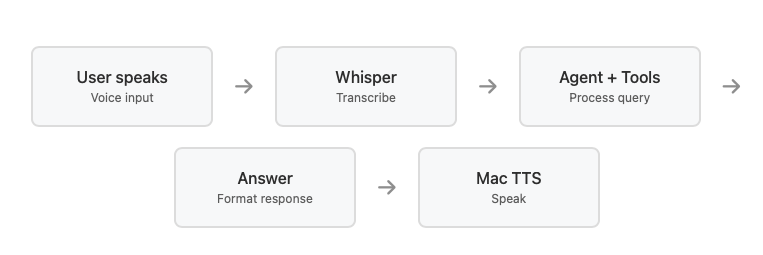
Here’s how I did it:
Bringing the agent to life
During the course, I built a first small project — a diet assistant for my girlfriend, integrated into Gradio (a Python library for building web UIs). The bot suggested daily recipes based on her diet plan, matching calories and ingredients.
After that, I moved on to the conversational agent, reused part of the same architecture — input parsing, processing, and output generation.
agent = CodeAgent( tools=[pipeline_by_region, weighted_forecast, top_deals, …], model=LiteLLMModel(model_id=“groq/llama-3.1-8b-instant”), instructions=“You are a RevOps assistant. Answer pipeline questions using only the provided tools. Keep answers concise.” )
Voice interaction flow
audio = record_audio(seconds=5) transcribed_text = transcribe_wav(audio) answer = agent.run(transcribed_text) speak(answer)
***Here's the core of how it works:** It takes natural language questions, generates Python code to query the data, and returns formatted answers. The voice layer wraps around this — recording audio, transcribing it with Whisper, sending it to the agent, and speaking the response back.*
To give the agent a voice, I used the Whisper base.en model for speech-to-text, which runs fine locally on a Mac, and configured LiteLLM as a unified interface to route requests to Groq's API, which provides optimized inference for Meta's Llama-3 8B model. For text-to-speech, I initially used my Mac’s default voice engine.
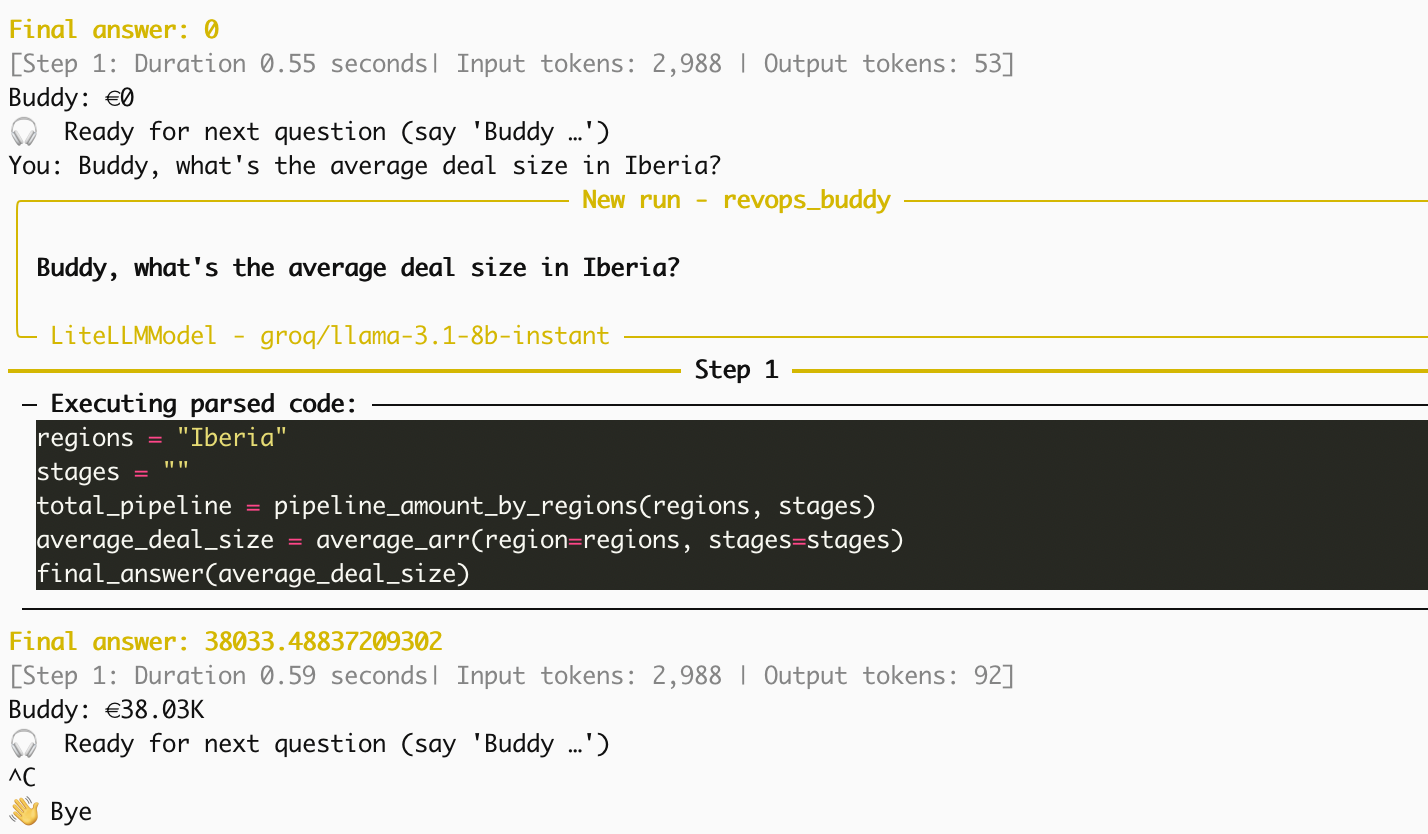
*RevOps Buddy answering pipeline questions in real-time. The agent generates Python code, executes it against the CSV data, and formats the response — all in under a second.*
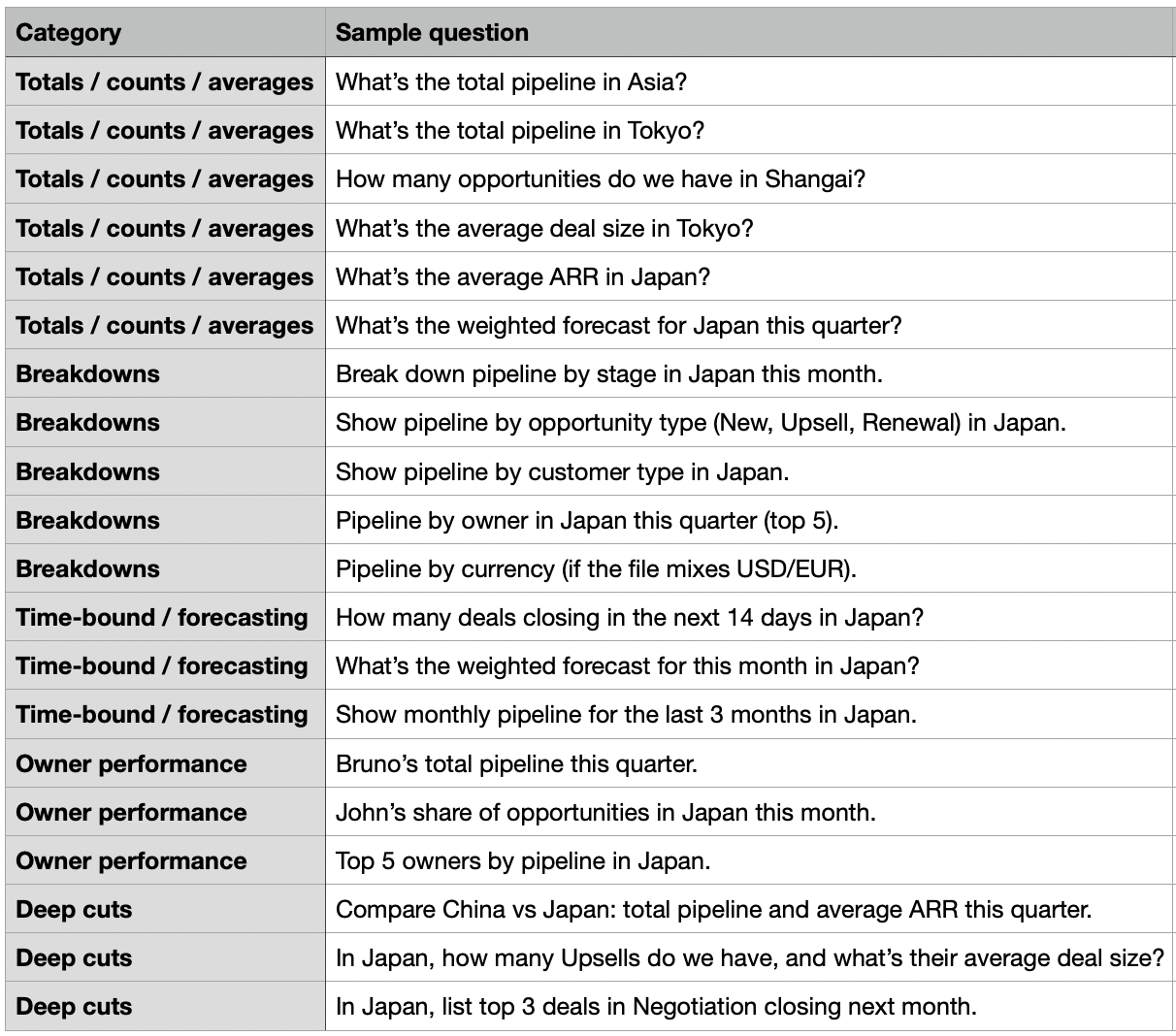
Some of the questions I tested:
But the agent, at this point, is still a **learner** — just like me. To become an expert, here are the next steps I have in mind:
- Saving recent interactions so it remembers context between user turns.
- Experiment with frameworks like LangGraph or CrewAI to enable multi-step or collaborative reasoning. These tools make agents better at reasoning through complex tasks step by step.
- Phoneme-based wake word detection.
- Replace Mac's default TTS with ElevenLabs for more natural speech
- Deploy it in and receive feedback from the ground.
Oh — and of course, find a better name than *RevOps Buddy*.